SQL Saturday NYC 2023! A Success!

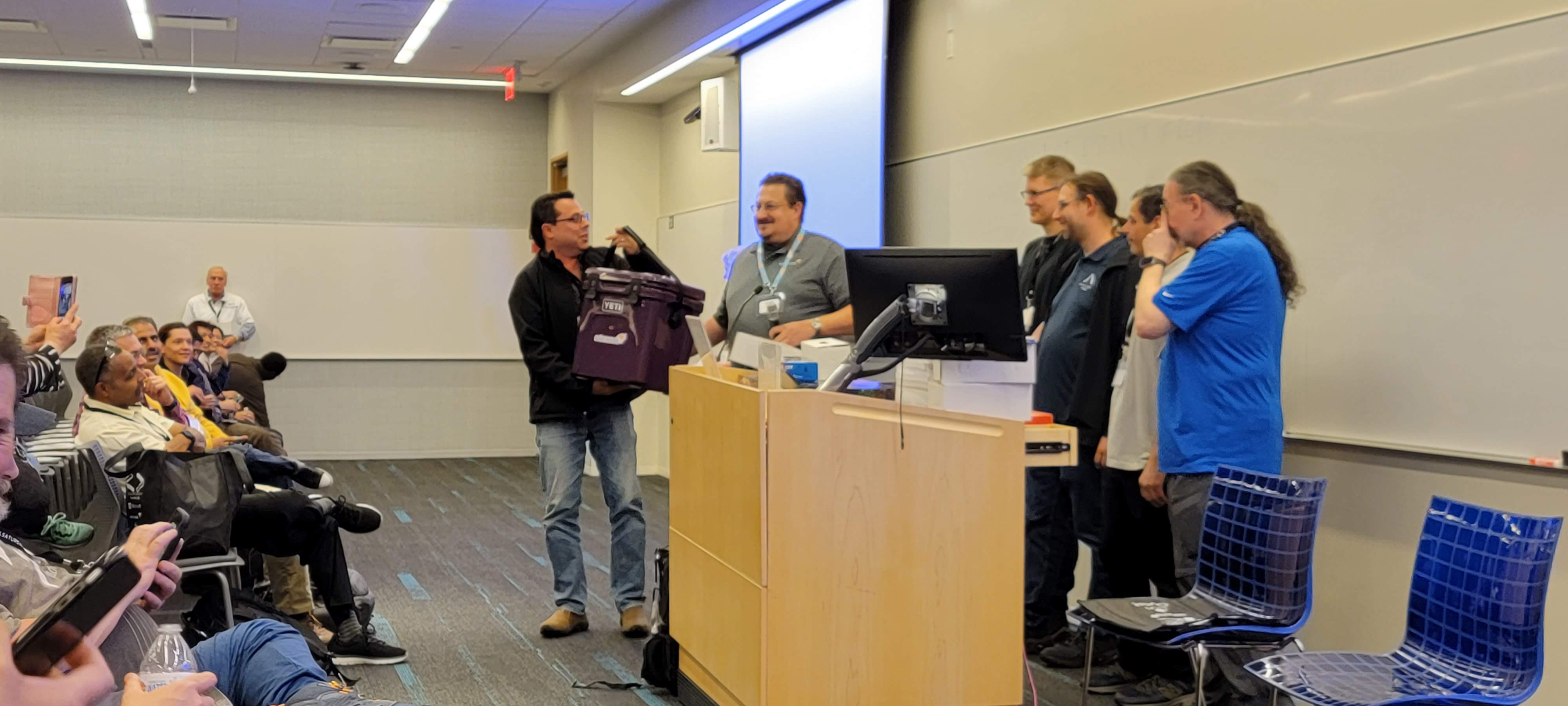
End of event prizes!

I must thank all the folks in the greater Microsoft MVP, and Volunteer, and user group, and other community for the great events you hold.

In particular, SQL Saturday NYC 2023, held at the Microsoft facility in Times Square was fantastic.

  • SQL Saturdays, and Data Saturdays, are volunteer-led events celebrating the Microsoft data platform including SQL Server.
  • SQL Saturday
  • Data Saturdays

Thanks to the sponsors, and to Microsoft for letting this group run this conference.

In summary, over 300 people showed up for free training, across 12 tracks, and 4 time slots, plus lunch sessions for a total of over 50 sessions!

The user groups represented include:

Here are some photos from the event.

I strongly encourage you to reach out if you think you might want to speak. There are coaches available, to help guide you. Many user groups are happy to have new speakers try out a short presentation, and then grow from there.

Side note, the event hands out prizes from the sponsors at the end!

Posted in Conferences, Data, Fun, SQL Server, Training, Uncategorized | Tagged , , , | 1 Comment

MySQL on Microsoft Azure

Migrating your workloads to Azure Database for MySQL

Microsoft has a long history of trying to make software development and administration of IT infrastructure easier overtime. Additionally, Microsoft in the last 10 years has embraced open source broadly.

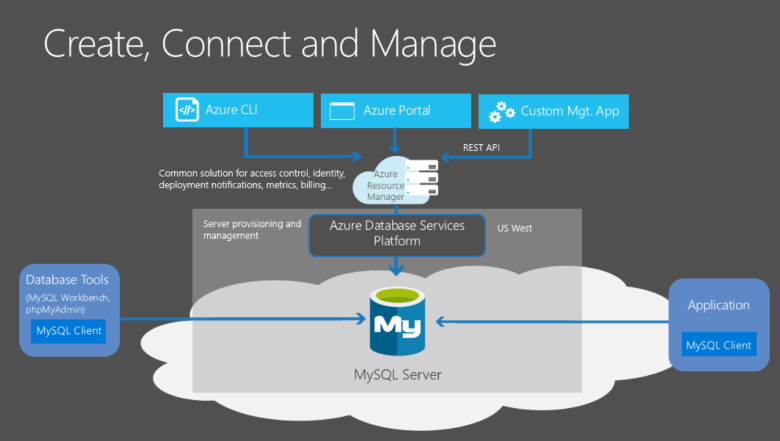
Microsoft Azure supports virtual machines, platform services, containers, serverless, and various other infrastructure. In this article, I will share some options you can make to deploy your software on MySQL in Azure.

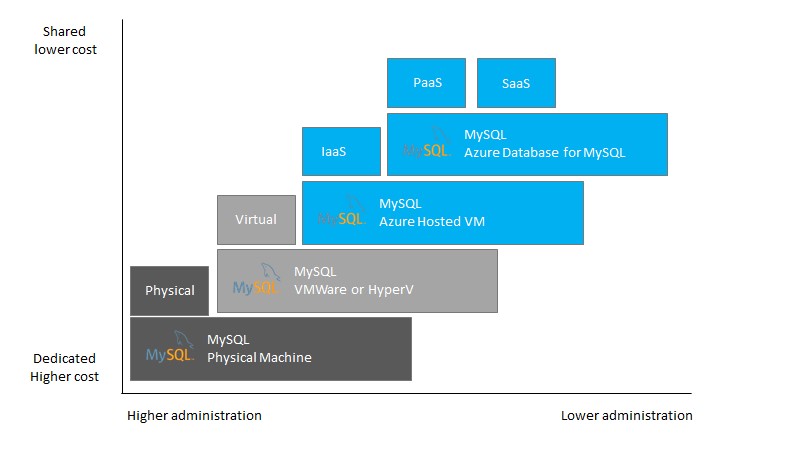
It may help you to look over the relative cost in terms of effort for administering your infrastructure versus physical, virtual on premises, Azure VM, or PaaS for your MySQL choices. This diagram works for many other products, like SQL Server, or web servers, or other infrastructure as well.

MySQL on Azure VMs. This option falls into the industry category of IaaS. With this service, you can run MySQL Server inside a managed virtual machine on the Azure cloud platform. All recent versions and editions of MySQL can be installed in the virtual machine.

Azure database for MySQL is a Platform Service (PaaS), fully managed MySQL database engine based on the stable version of MySQL community edition. With a managed instance of MySQL on Azure, you can use built-in features viz automated patching, high availability, automated backups, elastic scaling, enterprise grade security, compliance and governance, monitoring and alerting that require extensive configuration when MySQL Server is either on-premises or in an Azure VM.

Azure Database for MySQL, powered by the MySQL community edition, available in two deployment modes:

  • Flexible Server – A fully managed production-ready database service designed for more granular control and flexibility over database management functions and configuration settings. The flexible server architecture allows users to opt for high availability within a single availability zone and across multiple availability zones. The service supports the community version of MySQL 5.7 and 8.0. The service is generally available today in various Azure regions. Flexible servers are best suited for all new developments and migration of production workloads to Azure Database for MySQL service.
  • Single Server is a fully managed database service designed for minimal customization. The single server platform is designed to handle most database management functions such as patching, backups, high availability, and security with minimal user configuration and control. The architecture is optimized for built-in high availability with 99.99% availability in a single availability zone. It supports the community version of MySQL 5.6 (retired), 5.7, and 8.0. The service is generally available today in various Azure regions. Single servers are best-suited only for existing applications already leveraging single server. A Flexible Server would be the recommended deployment option for all new developments or migrations.

I have two customers, who each had in-house developed applications with MySQL as the database engine, chose Azure Database for MySQL to migrate to as they moved from on-premises to Azure. Each customer has over 200 databases hosted on many MySQL servers.

Migration choices for Azure Database for MySQL

For detailed information and use cases about migrating databases to Azure Database for MySQL, refer to the Database Migration Guide. This document provides pointers to help you successfully plan and execute a MySQL migration to Azure.

Microsoft has a great set of learning on our website, with tutorials to get familiar with tools and processes. Here is the learning path for migrating MySQL from on-premises to Azure.

I hope this article helps clear up the choices of MySQL on Azure, as well as giving you information for how to migrate and learn more.

Posted in Architecture, Azure, Data, Open Source, SQL Server | Tagged , , , , , | Leave a comment

Presenting to others – Yes, you can.

Now that Covid has receded from the forefront, in-person events are getting back into the swing.

October 2022!

I had the great pleasure of presenting to both SQL Saturday Boston, as well as the Capital Area SQL Server user group near Albany NY!

I encourage each of you, no matter what the topic, to consider doing a small presentation with a local user group. I would suggest meetup for many tech-oriented groups.

Feel free to reach out to me as well. I can offer reviews of your work, because others may see value.

Posted in Conferences, Fun, Training | Tagged , , | Leave a comment

Azure SQL Vulnerability Assessment

The goal of this post is to show Azure SQL Database, and how the vulnerability scans available can help you baseline security, and how to remediate one of the items.

Azure SQL Database is a great way to host your relational data in Azure. One of the benefits you get is vulnerability assessments, with clear explanations and links for remediation.

This link will cover some of the items we wish to review: https://docs.microsoft.com/en-us/azure/sql-database/sql-vulnerability-assessment

Main Article:

https://techcommunity.microsoft.com/t5/data-architecture-blog/azure-sql-database-and-vulnerability-scans/ba-p/1397031


Posted in Azure, Data, Security, Uncategorized | Tagged , , , , | Leave a comment

Linkedin learning and Teams: Working remotely

Sun through trees

Sun through trees

I wanted to share some resources to help businesses out in this day and age. These links are both about managing and working remotely, as well as using Teams to facilitate videoconferencing. I have a previous post as well for some recommendations on working remotely

LinkedIn Learning | Free courses to help your employees make this transition
https://www.linkedin.com/learning/paths/remote-working-setting-yourself-and-your-teams-up-for-success?u=104

Top 3 most popular free courses from LinkedIn learning for this transition

1. Leading at a Distance – 36 min

2. Time Management: Working From Home – 1hr 25 min

3. Working Remotely – 1 hr.

Working remotely during challenging times
https://www.microsoft.com/en-us/microsoft-365/blog/2020/03/02/working-remotely-during-challenging-times/

How to use Teams – 15 minute review
https://www.bing.com/videos/search?q=how+to+use+teams&docid=608044283494600468&mid=D54FEBF6C7BA10F786E3D54FEBF6C7BA10F786E3&view=detail&FORM=VIREHT

How to use Teams for video conferencing and calls
https://www.bing.com/videos/search?q=how+to+use+teams&&view=detail&mid=25657041845498B2B44925657041845498B2B449&rvsmid=D54FEBF6C7BA10F786E3D54FEBF6C7BA10F786E3&FORM=VDRVRV

Posted in Conferences, Job Performance, Training | Tagged , , , , , | Leave a comment

How to have remote meetings in today’s world

20200216_164033The world is adjusting to “social distancing”. Conferences and gatherings have been cancelled. However, meetings and instruction and learning still need to happen. What should we do?

This post is to help talk through remote meetings, how to run them, and the tools that are available.

I have worked “From Home” for over 13 years now. Some of this is my experience, and some is solid advice gathered from other people’s experience.

Most phones and laptops nowadays have a forward-facing camera. Consider this helpful for people to see you, and you to see others.

Use these tools to have calls with others! Keep in touch, and show off what is going on around your home, or outside area. What did you buy? What’s new and interesting. Be human. It’s okay.

Also, if you want to have a remote meeting for a user group or other gathering, consider the following ideas strongly:

Best practices for remote meetings

  1. Send out an agenda ahead of schedule. Ask for feedback. Incorporate the feedback and put estimated times for different items. Leave 10-15 minutes for question and answer.
  2. Designate a moderator. That moderator needs to be clear about the meeting, and if a smaller meeting, should designate who does a “Roll call” aka who is on the meeting. The moderator should also check on chat.
  3. Moderators should understand the need for muting people to reduce noise.
  4. Attendees: Mute yourself unless you are given permission to talk. Even when typing.
  5. Roll Call: Call out each person listed in the meeting. Ask if they want to introduce themselves as well.
  6. Questions should be entered in the chat window. Some folks can answer on the fly by chat, or the presenter can pause and check on chat (with moderator’s help).
  7. Attendees: Name yourself before talking. “Hi, George Walters here. I wanted to know…”
  8. ONE  PERSON TALKS AT A TIME. Be patient, and mindful some are nervous about speaking on the phone. Let them finish. Ask if they are finished.
  9. PLEASE ask questions. This helps with making the meeting feel more natural. We are humans, and want to talk, and also want to help give information. Ask any question.
  10. Consider a round-robin approach where each person gets a few minutes for ideas or discussion. This equalizes the table between extroverts and introverts. Both are valid, and all voices need to be heard.
  11. Organizers: Consider having a few people designated as official “Question people” to break the ice for the others who are a little less extroverted.
  12. Dominating people will not be allowed to take over the meeting.
  13. Schedule a follow up for deeper topics not on the agenda.
  14. Thank everyone for their time. Also ask for follow up questions, and whether the meeting was recorded, and where to access it.
  15. Be clear about follow ups post meeting. Who owns what item, and what time frame it should be done.
  16. Leverage Email for follow ups, as a best practice for any meeting.


That’s the operational items I see help bring success to any meeting held online.

What tools can I use?

The tools available for videoconferencing are all over the map.

Here are the ones I think of as being great:

For individuals and small groups:

Skype! (Cross platform! Mac, Linux, Windows, Android, iOS, xbox)

https://www.skype.com/en/free-conference-call/

Teams is intended for organizations where an administrator and people of varying roles would use it. It can also be used for shared document storage, whiteboarding, and note-taking.

Teams! (Cross platform! Mac, Linux, Windows, Android, iOS)

https://teams.microsoft.com/downloads

Zoom conferencing

https://zoom.us/

LogMeIn

https://www.logmein.com/products

Go to Meeting

https://www.gotomeeting.com/

Slack

https://slackhq.com/

Other choices were reviewed by pcmag

https://www.pcmag.com/picks/the-best-video-conferencing-software

This post was to help talk through remote meetings, how to run them, and the tools that are available.  Please let me know if you have other ideas or feedback. Thank you!

Posted in Conferences, Fun, Job Performance, Training | Tagged , , , , , | 1 Comment

How to choose a cloud relational database when you know SQL Server

When choosing to migrate applications into Azure, many organizations want to reduce the burden of patching and maintenance. Going towards platform as a service (PaaS) helps in this journey.

If you have some control over the code used in the application, administrative and operational costs can be reduced by migrating your data tier towards platform services (PaaS) instead of SQL Server in a virtual machine (Infrastructure as a Service, otherwise known as IaaS).

For the relational database for reduced operational effort, Microsoft’s SQL Server engine also comes in PaaS, and provides the following deployment options for an Azure SQL database:

  • Single database represents a fully managed, isolated database. You might use this option if you have modern cloud applications and microservices that need a single reliable data source. A single database is similar to a contained database in Microsoft SQL Server Database Engine.
  • Managed instance is a fully managed instance of the Microsoft SQL Server Database Engine. It contains a set of databases that can be used together. Use this option for easy migration of on-premises SQL Server databases to the Azure cloud, and for applications that need to use the database features that SQL Server Database Engine provides.
  • Elastic pool is a collection of single databases with a shared set of resources, such as CPU or memory. Single databases can be moved into and out of an elastic pool.

For Azure SQL Database or Managed Instance, you do not have to manage upgrades, high availability, or backups. In general, Azure SQL Database can dramatically increase the number of databases managed by a single IT or development resource. Elastic pools also support SaaS multi-tenant application architectures with features including tenant isolation and the ability to scale to reduce costs by sharing resources across databases. Managed instance provides support for instance-scoped features enabling easy migration of existing applications, as well as sharing resources amongst databases.


Service tiers

Azure SQL Database offers three service tiers that are designed for different types of applications:

  • General Purpose/Standard service tier is designed for common workloads. It offers budget-oriented balanced compute and storage options.
  • Business Critical/Premium service tier is designed for OLTP applications with high transaction rate and lowest-latency I/O. It offers the highest resilience to failures by using several isolated replicas.
  • Hyperscale service tier is designed for very large OLTP database and the ability to auto-scale storage and scale compute fluidly.


When to choose the General Purpose/Standard service tier

General Purpose service tier is a default service tier in Azure SQL Database that is designed for most of the generic workloads. If you need a fully managed database engine with 99.99% SLA with storage latency between 5 and 10 ms that match Azure SQL IaaS in most of the cases, General Purpose tier is the option for you.

Find resource characteristics (number of cores, IO, memory) of General Purpose/Standard tier in Managed Instance, Single database in vCore model or DTU model, or Elastic pool (groups of databases with aggregate throughput) in vCore model and DTU model.


Who should consider the Business Critical service tier

Business Critical service tier is designed for the applications that require low-latency responses from the underlying SSD storage (1-2 ms in average), fast recovery if the underlying infrastructure fails, or need to off-load reports, analytics, and read-only queries to the free of charge readable secondary replica of the primary database.

Some  key reasons why you should choose Business Critical service tier instead of General Purpose tier are:

  • Low IO latency requirements – workload that needs the fast response from the storage layer (1-2 milliseconds in average) should use Business Critical tier.
  • Frequent communication between application and database. Application that cannot leverage application-layer caching or request batching and need to send many SQL queries that must be quickly processed are good candidates for Business Critical tier.
  • Higher availability – Business Critical tier in Multi-AZ configuration guarantees 99.995% availability, compared to 99.99% of General Purpose tier.
  • Fast geo-recovery – Business Critical tier configured with geo-replication has a guaranteed Recovery point objective (RPO) of 5 sec and Recovery time objective (RTO) of 30 sec for 100% of deployed hours.


Who should consider the Hyperscale service tier

The Hyperscale service tier is intended for most business workloads as it provides great flexibility and high performance with independently scalable compute and storage resources. With the ability to auto-scale storage up to 100 TB, it’s a great choice for customers who:

  • Have large databases on-premises and want to modernize their applications by moving to the cloud
  • Are already in the cloud and are limited by the maximum database size restrictions of other service tiers (1-4 TB)
  • Have smaller databases, but require fast vertical and horizontal compute scaling, high performance, instant backup, and fast database restore.

The Hyperscale service tier supports a broad range of SQL Server workloads, from pure OLTP to pure analytics, but it is primarily optimized for OLTP and hybrid transaction and analytical processing (HTAP) workloads.

I hope this helps guide you in your relational data journey to the cloud.


Posted in Azure, Data, SQL Server | Tagged , , , , , , | Leave a comment

10 years of people and technology: What did I learn?

In the last 10 years I have evolved from a deep dive technical troubleshooter into a conference speaker, technical seller, and mentor. How exactly did this happen? Every bit of my experience in the past has helped when I am talking to customers period one of the important things to know is that people relate to stories about people even if it’s a technical discussion. Let me illustrate some of my history.

In 2009 I was 3 years into my role as a Premier field engineer on the Premier Support services arm of Microsoft. This role involved proactive and reactive support to large customers of Microsoft. I was delivering workshops to varied groups of people on a lot of SQL Server technology. I realized I was talking to people managers and sometimes managers of managers all the way down to technical people.

What was extremely important was to have advice from other people. I was blessed to have a great manager who always came up with ideas for how to improve and operate better period some of the suggestions including helping to train the technical account managers who were in charge of the account side of support. Other opportunities came up to provide new content and deliver new workshops and assessments.

Part of this role sometimes involved the product team to help get new features built or encourage fixes for issues that customers were seeing. I definitely valued every interaction there and have enjoyed adding these people to my network of resources.

These cumulative experiences led to other people recognizing my abilities. I was also fortunate to have a great interpersonal ability. As the role evolved overtime it became apparent that the product itself was getting features that would help improve performance. At this point it became obvious that there were times the customer should buy a new version of SQL Server instead of sitting on old stuff and having terrible performance.

The other side of my job was helping to ramp up new hires, as well as do interview loops for new hires. This was definitely a different way of thinking, because we have to decide what is best for Microsoft as well as for the candidate. In our group we tried our best to make sure that candidates would be informed of what they were going to go through comma and if they needed further education or help to be qualified for the role, we would make sure that they would know that as well.

By 2012 I was ready to transition to a new role in technical sales. This role focused more on helping sales people advocate to customers the technical side of why they should adopt new technology. Some of this involved workshops similar to performance tuning workshops i did in the past. In this case, I was showing off the new features of SQL Server 2012 or later.

As time moved forward, I got better at those higher-level discussions with C-level executives, and continued to deliver technical material to keep myself grounded. It was in this time frame where i got involved with the user group around SQL Server and started to get involved in SQL Saturdays. I also was mentoring people who wanted to move from support to sales.

I have been delivering at SQL Saturdays across the northeast US and down into the south since 2013. I also had a chance to deliver internally at Microsoft at our TechReady conference. Some of the material included SQL Server tuning, new features in new versions of SQL Server, business intelligence, Azure cloud migrations, and more recently professional development.

I love seeing when people progress in their careers. On the non-technical side, I was also involved in hiring decisions, on-boarding new salespeople and cloud architects. In one case I knew that the candidate was supremely qualified. When i had them walk into the room, I glanced at their resume, dropped it on the table, looked at them, and asked why they were there. They were the perfect candidate, and I had to argue up the chain to make sure that they were considered strongly. They were hired, and very successful. At this point they have moved on in their careers and have become a people manager of technical people.

In early 2018 I moved to the partner side of Microsoft as a partner technical strategist helping a portfolio of partners adopt our cloud technologies. This is both a technical sales position, as well as a strategic position. What is interesting here is that instead of being involved in the sales process directly, my job is to help a partner company learn how to adopt cloud to help their sales process improve.

In this new org, I realized that some folks were not familiar with the other pieces of Microsoft that i had experienced. When working with partners, there’s always account teams on the sales side as well as support that might need to be engaged. I made sure to have mentoring sessions for my peers to help educate them and to get feedback from them on this org’s particular unique strengths.

With my prior experience ramping up sales people and being in hiring loops, I was able to help be in screening calls for college hires, as well as in person finals interviews for college hires. I enjoyed and respected the role I took as part of the team to choose candidates for both internships and permanent roles.

My advice to most people is to figure out what you’d like to do and then volunteer when opportunities open. Be open to trying new things and listening to people who are giving advice. When you have a choice, do what is right, rather than what you think you’re “Allowed” to do. When your boss questions you, hopefully they will have your back when you explain you did what was right.

I’m happy to talk with anybody about some of my experiences as well as what I hear others experience. Feel free to reach out to me. I hope you have a great day!

George’s Twitter

George’s LinkedIn

Posted in Azure, Data, Job Performance, Partner, SQL Server, Training | Tagged , , , , , | Leave a comment

Best practices for SQL Server Availability

Microsoft, since 2012, has recommended Always-On Availability Groups as the Tier 1 solution for SQL Server databases.

Here are the “Always On” Architecture guides: https://blogs.msdn.microsoft.com/sqlalwayson/2012/07/03/alwayson-architecture-guides/

In particular, this guide is thorough, is written by still-famous experts in the SQL Server world, who do real world implementations of highly available and scalable solutions. https://docs.microsoft.com/en-us/previous-versions/sql/sql-server-2012/hh781257(v=msdn.10)

Additionally, the Microsoft “SQLCAT” (which stood for SQL Customer Advisory Team) (Largest Enterprises migrating to SQL Server from, shall we say, other platforms) has lots of best practice articles on AlwaysOn Availability Groups. https://blogs.msdn.microsoft.com/sqlcat/tag/availability-groups/

Specifically, 5 years ago, they documented doing Availability Groups in Azure VMs. This is far simpler nowadays. https://blogs.msdn.microsoft.com/sqlcat/2014/09/22/extending-alwayson-availability-group-to-remote-azure-datacenter-powershell/

From SQL 2005 through SQL 2008R2, “Highly Available with Disaster Recovery” would have been Failover Instance clusters, with a secondary copy delivered via Database Mirroring.

This architecture was used by a company known as the NASDAQ stock exchange, and was a case study back then. http://download.microsoft.com/documents/customerevidence/Files/49271/NASDAQ_SQLServer_Word.doc

AlwaysOn is a single-solution way to achieve even higher availability than with Failover Instances, with secondary copies in a different region. NASDAQ and others adopted AlwaysOn Availability Groups in place of old combinations of failover instances and mirroring or log shipping.

I will quote the document, and then the sections below will dive into detail. Note, the below is for SQL 2012. 2014 increased number of secondaries, and 2016 improved number of synchronous copies, as well as throughput. The best solution is on top, and goes down from there in terms of RPO and RTO.

Contrasting RPO and RTO Capabilities

The business goals for Recovery Point Objective (RPO) and Recovery Time Objective (RTO) should be key drivers in selecting a SQL Server technology for your high availability and disaster recovery solution.

This table offers a rough comparison of the type of results that those different solutions may achieve:

High Availability and Disaster Recovery

SQL Server Solution

Potential Data Loss (RPO) Potential Recovery Time (RTO) Automatic Failover Readable Secondaries(1)
AlwaysOn Availability Group – synchronous-commit  

Zero

Seconds Yes(4) 0 – 2 (0-3 in 2016)
AlwaysOn Availability Group – asynchronous-commit  

Seconds

Minutes No 0 – 4 (0-8 in 2014)
Failover Cluster Instance NA(5) Seconds-to-minutes Yes NA
Database Mirroring(2)High-safety (sync + witness)  

Zero

Seconds Yes NA
Database Mirroring(2)High-performance (async)  

Seconds(6)

Minutes(6) No NA
Log Shipping Minutes(6) Minutes

-to-hours(6)

No Not during

a restore

Backup, Copy, Restore(3) Hours(6) Hours

-to-days(6)

No Not during

a restore

(1) An AlwaysOn Availability Group can have no more than a total of four secondary replicas (eight in 2014), regardless of type.

(2) This feature will be removed in a future version of Microsoft SQL Server. Use AlwaysOn Availability Groups instead.

(3) Backup, Copy, Restore is appropriate for disaster recovery, but not for high availability.

(4) Automatic failover of an availability group is not supported to or from a failover cluster instance.

(5) The FCI itself doesn’t provide data protection; data loss is dependent upon the storage system implementation.

(6) Highly dependent upon the workload, data volume, and failover procedures.

Solutions on Azure with Virtual Machines for SQL Server.

Best Practice option: Always On Availability Groups with SQL Enterprise. Backups should also be done and quickly available.

The edition of SQL Server matters. Enterprise is the top tier, and using its features such as Always-On Availability groups are recommended for 24×7 operation. https://docs.microsoft.com/en-us/sql/sql-server/editions-and-components-of-sql-server-2017?view=sql-server-2017

Standard edition, from the link above, shows up as “Basic data management …. For departments and small organizations”. Under high availability from the same link,

“Always On Availability Groups is not available in Standard Edition.”

This automatically makes it a lower uptime. Failover instances were great technology 20 years ago, but they were surpassed by database mirroring for faster failover back in 2005. Today, it’s more of a legacy compatibility feature.

Basic availability groups is basically Database Mirroring, but modernized for SQL 2016.

All up Business continuity and disaster recovery for SQL Server is here:

https://docs.microsoft.com/en-us/sql/database-engine/sql-server-business-continuity-dr?view=sql-server-2017

When you read this, know that we want our customers and partners to be successful, for the application intended.

The modern way is via Always On Availability Groups, which permit going higher level on a secondary copy of data, testing on that secondary copy, and then failing over to the secondary.

Way lower in the article is the non-cluster way:

“Log shipping

If recovery point and recovery time objectives are more flexible, or databases are not considered to be highly mission critical, log shipping is another proven availability feature in SQL Server. Based on SQL Server’s native backups, the process for log shipping automatically generates transaction log backups, copies them to one or more instances known as a warm standby, and automatically applies the transaction log backups to that standby. Log shipping uses SQL Server Agent jobs to automate the process of backing up, copying, and applying the transaction log backups.”

Since words matter, and clarity is key: Mission Critical means using Always On Availability Groups for the best choice.

SLAs are important. We document them clearly:

https://azure.microsoft.com/en-us/support/legal/sla/virtual-machines/v1_8/

  • For all Virtual Machines that have two or more instances deployed across two or more Availability Zones in the same Azure region, we guarantee you will have Virtual Machine Connectivity to at least one instance at least 99.99% of the time.
  • For all Virtual Machines that have two or more instances deployed in the same Availability Set, we guarantee you will have Virtual Machine Connectivity to at least one instance at least 99.95% of the time.
  • For any Single Instance Virtual Machine using premium storage for all Operating System Disks and Data Disks, we guarantee you will have Virtual Machine Connectivity of at least 99.9%.

“Availability Set” refers to two or more Virtual Machines deployed across different Fault Domains to avoid a single point of failure.

To get the best availability, the Always On Availability Group cluster would have to be in an “Availability Set”, which ensures our back end maintenance does not take all of those machines down at the same time.

Also, in reality, monthly patching will require downtime unless you are protected by Always On Availability Groups (Or, at the least, automatic failover by a failover instance).

Therefore, outside of patching and other maintenance, you can expect no better than three 9’s (99.9%) virtual machine connectivity. It might be better, but it is not guaranteed.

The differences between a failover instance and availability groups are laid out here:

https://docs.microsoft.com/en-us/sql/database-engine/availability-groups/windows/failover-clustering-and-always-on-availability-groups-sql-server?view=sql-server-2017

If you prefer video information, David Pless, of Microsoft, my coworker for 13 years, and great presenter, presented AlwaysOn Availability groups to the PASS (Professional Association of SQL Server) High Availability Disaster Recovery virtual chapter.

https://www.youtube.com/watch?v=UfloWwsyXLM

Finally, for SQL Server on Azure VMs, here is a performance guide, so you can plan or adjust to a well-performing setup. https://docs.microsoft.com/en-us/azure/virtual-machines/windows/sql/virtual-machines-windows-sql-performance

Customer Evidence:

GE Healthcare lifted-and-shifted to the Azure Cloud, and leveraged VMs with .NET and SQL Server in Always On Availability Groups in Virtual Machines.

GE Healthcare and Microsoft kicked off a proof of concept for transitioning apps that were running in a production environment on-premises to Microsoft Azure. The transition was seamless using Microsoft Azure Virtual Machines (VMs). The VMs host multiple application components, including database instances running on SQL Server software and business logic running in Microsoft .NET Framework assemblies. Both SQL Server and .NET on Microsoft Azure VMs provide full compatibility with on-premises infrastructure. In addition, the SQL Server AlwaysOn feature ensures high availability.

https://customers.microsoft.com/en-us/story/731798-ge-healthcare-delivers-core-customer-solutions-on-the

Here is a Retail example customer case study, leveraging SQL Server and Always On Availability Groups on Azure:

https://customers.microsoft.com/en-us/story/vapiano

Outside of failover being automatic: ENTERPRISE edition can keep databases up and running and maintained longer. I collected data from many places to put this “Do you need Enterprise again” after the updates post SP1 of SQL 2016 towards SQL Standard. More features have come to enterprise edition since, for 2017 and soon to come 2019.

https://georgewalters.wordpress.com/2016/12/22/sql-2016-sp1-do-you-ever-need-sql-enterprise-again-tldr-yes/

Mid-Tier option:

Leveraging either Basic Availability Groups or Failover Instances with SQL Standard, would be cheaper, but has significant performance scale limits, and risks around uptime.

https://docs.microsoft.com/en-us/sql/database-engine/availability-groups/windows/basic-availability-groups-always-on-availability-groups?view=sql-server-2017

Not recommended (Low-tier option):

What about using a single instance of SQL Standard?

That’s pretty much not covered in any talk above about Enterprise, Availability, or Scale.

I would warn strongly against “saving money” by being exposed by a relatively low-availability configuration such as a single virtual machine hosting SQL Server databases.

Upgrades and patching in this scenario has vastly increased risk, as rollback basically includes a reinstall and exporting and importing data. If this matches your needs, that is fine then. Be aware of this when planning your upgrades and downtimes.

Support options

With higher needs, you need better support. Here are the options. Note, Production is basic for most production needs, and then Professional or Premier support is recommended.

https://azure.microsoft.com/en-us/support/options/

https://azure.microsoft.com/en-us/support/plans/


Future Strategy

Someday, you might plan to migrate and update code, and get to a world of cloud-native configurations.

I have helped major companies migrate thousands of databases to Azure SQL Database. It took some code rework, but their investment in that led to equal cost as on-prem, but without the following headaches:

  • Patching
  • Scaling
  • Deployment issues

Granted, it took time for them and others to do that all. In the end, you can read about Paychex, a time-tracking company, who did that here:

https://www.businessinsider.com/paychex-microsoft-azure-sql-database-2019-5

The SLAs for this, where you DO NOT have to patch, and you get backups included for free, and easy multi-region deployment as needed is here:

https://azure.microsoft.com/en-us/support/legal/sla/sql-database/v1_2/

  • Azure SQL Database Business Critical or Premium tiers configured as Zone Redundant Deployments have an availability guarantee of at least 99.995%.
  • Azure SQL Database Business Critical or Premium tiers not configured for Zone Redundant Deployments, General Purpose, Standard, or Basic tiers, or Hyperscale tier with two or more replicas have an availability guarantee of at least 99.99%.
  • Azure SQL Database Hyperscale tier with one replica has an availability guarantee of at least 99.95% and 99.9% for zero replicas.

Posted in Architecture, Azure, Data, SQL Server | 1 Comment

Modern Migration Tour: SQL 2019 upgrade event in Burlington MA

On Saturday June 8th, in partnership with the SQL Tiger team, Boston Business Intelligence and New England SQL User Group leaders delivered a PASS and Microsoft and Intel Modern Migration event, covering SQL 2019 and Intel hardware, in Microsoft’s Burlington, MA office.

The morning was two sessions in lecture format. The afternoon was hands-on labs.

Without a doubt, having 49 people show up on a beautiful, warm, sunny Saturday, when it rained for 6 months, is amazing.

MORE AMAZING: Everyone stayed for the afternoon hands-on labs, where they used free tools Microsoft provides, to diagnose upgrade issues from SQL 2008 to 2017, and teamed up to help each other.

Registrants were told to set up their laptops in advance. The following tools were used:

  1. SQL Express 2008R2 edition with advanced services.
  2. SQL 2017 developer edition
  3. SQL Server Management Studio version 18.0
  4. Data Migration Assistant v4.3
  5. Database Experimentation Assistant 2.6

Lab details are handed out at the event. Essentially, a SQL 2008 database that had upgrade issues was installed on the SQL 2008R2 instance. The migration assistant was used to find static code issues. The Experimentation assistant is used to help performance-test after resolving upgrade issues.

These real-world migration scenarios, walked through in this lab, up-skill Database professionals to handle these situations as they arise. Years ago this was done through hard manual labor and custom scripts. Now, free tools from Microsoft can ease this upgrade.

On the Intel hardware front, there are amazing new technologies that help reduce the number of cores needed for a particular workload. As a long-time professional in this space, the hardware innovation coupled tightly with Microsoft’s software is an amazing combination.

Feedback for this event was overwhelmingly positive, with long-time user group folks saying it was the best event ever.

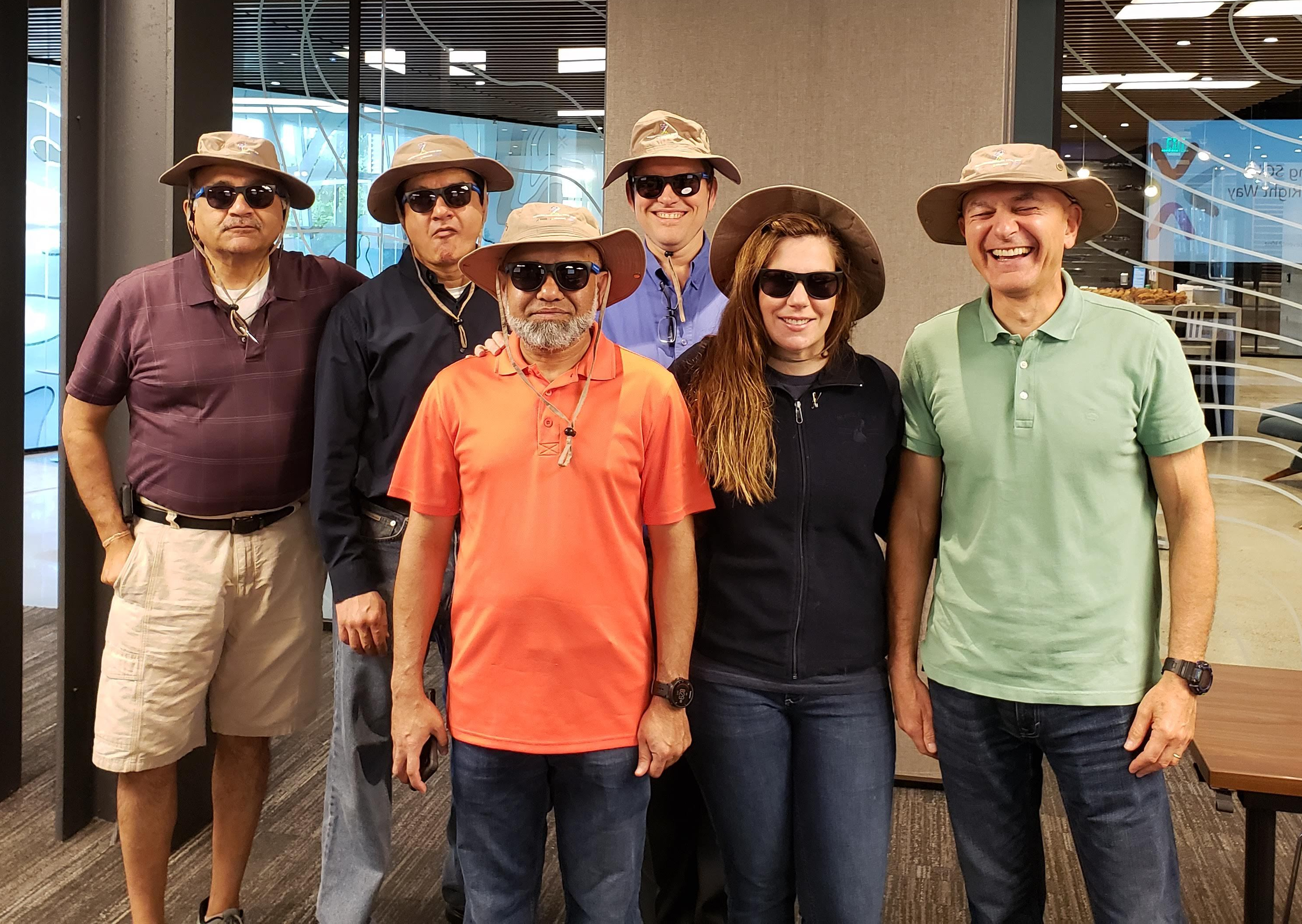
From left to right: Paresh, Mitesh, Taiob, George (myself), Elizabeth, and Vladimir. Thank you for helping organize, and for delivering this content.

6 people in hats, smiling for camera

SQL 2019 Migration Tour speakers

Finally, we thank PASS, who Microsoft helped start 20 years ago to help spread the message of the Microsoft data platform. They, in conjunction with our SQL Tiger team, put together the materials and training for us trainers in this event.

For those interested, the New England SQL Server user group has around 3000 members, and the Boston BI user group has around 2500 members. Please join us via Meetup:

Link to New England SQL User group posting: https://www.meetup.com/NESQLUG/events/261451694/

Link to Boston BI User group:
https://www.meetup.com/Boston_BI/

SQL Server Tiger team blog:
https://techcommunity.microsoft.com/t5/SQL-Server/bg-p/SQLServer/label-name/SQLServerTiger


Posted in SQL Server, Training | Tagged , , , , | Leave a comment