-
Recent Posts
Recent Comments
Archives
- September 2025
- August 2025
- May 2025
- April 2025
- March 2025
- October 2024
- May 2024
- December 2023
- July 2023
- May 2023
- November 2022
- October 2022
- May 2020
- March 2020
- February 2020
- December 2019
- June 2019
- May 2019
- April 2019
- March 2019
- February 2019
- December 2018
- September 2018
- May 2018
- March 2018
- February 2018
- September 2017
- August 2017
- July 2017
- June 2017
- April 2017
- January 2017
- December 2016
- October 2016
- May 2016
- April 2016
- March 2016
- February 2016
- January 2016
- December 2015
Categories
Meta
SQL Saturday! Albany July 29, 2017 – Come and learn Databases and BI!
SQL Saturdays are free training events, put on by volunteers who deliver great content to you, the audience, all around Microsoft SQL Server, and surrounding technologies.
The technology stack can range from the relational engine, to Business Intelligence, Security, and out to adjacent technologies such as Powershell (for scripting), Hadoop and Big Data, and data lakes.
The people who volunteer range from Microsoft MVPs (recognized community contributors) and regular folks like yourself who got bit by the teaching bug.
Please come, and sign up here:
Note: Most of the people who teach at these events are on Twitter, and can be discovered just by searching for PASS (Professional Association of SQL Server) or SQL Saturday.
Thanks, and happy learning!
Posted in Azure, Business Intelligence, Data, Uncategorized
Tagged Azure, Business Intelligence, Powershell, Security, SQL Saturday, SQL Server
Leave a comment
Power BI: Pro Versus Premium
I have been sharing Power BI with customers for some time now. A quick tour is here.
At a high level, Power BI lets you pull together one or more data sources, and create visualizations that are interactive. With our cloud capabilities, we enable english-language querying of these data models, and also offer statistical insights.
As of May 3rd, we announced some changes to the pricing and added a premium service option.
The raw components to make this work include the free Power BI Desktop, the Power BI Service, and Power BI Premium. Reports that are to be shown outside of your organization can leverage the Power BI API for external report consumption.
Once an organization gets used to mashing together data in this desktop, they will need to share with others inside the organization.
Sharing and publishing shared content requires Power BI Pro licensing. This is a per-user license, and can be added onto Office 365, or purchased as a stand-alone option.
At some level, there may be a large number of “occasional readers” of reports. The pricing for these people may not make sense to consume content with the per-user pro license. For the readers at scale, Power BI Premium makes great sense.
More deep-dive links are below, around administering and provisioning Power BI and Premium capacity. Feel free to ping me for more information!
Latest Video from Adam Saxton on announcements from the Data Insights Summit:
Power BI Premium, and what is it. (Pro versus premium tables are here)
https://powerbi.microsoft.com/en-us/documentation/powerbi-premium/
Power BI Premium white paper
http://download.microsoft.com/download/8/B/2/8B23B40C-E94B-49D6-AF19-456AC4D5DB00/Power%20BI%20Premium%20whitepaper%20v1a.pdf
A Power BI Administrator needs to “purchase” the premium capacity.
How to purchase Power BI Premium
https://powerbi.microsoft.com/en-us/documentation/powerbi-admin-premium-purchase/
Administering Power BI in your organization
https://powerbi.microsoft.com/en-us/documentation/powerbi-admin-administering-power-bi-in-your-organization/
Posted in Business Intelligence, Data
Leave a comment
Why migrate from Oracle to SQL Server? Especially in a hybrid scenario?
I was asked this question, and figured out a few things have moved forward since I thought about this in depth.
There are so many reasons why to get rid of your expensive exadata and oracle licenses, and Microsoft does offer help if you are interested. Total cost of ownership has been shown to be much lower, and the throughput is excellent.
What I shared with my customer came to the following links:
Why else would the NASDAQ throw a 2 PETABYTE data warehouse on SQL (2014)?
SQL Server SURPASSED Oracle in the “Operational Database Systems” magic quadrant since 2014. We have been excellent in the data warehousing category as well.
https://www.microsoft.com/en-us/sql-server/sql-license-migration
SQL 2016 is extremely fast. Check the TPC-H results for Data Warehousing
SQL Server is more secure than Oracle in terms of vulnerabilities
We also have “Always Encrypted”
“In SQL Server 2016, for the first time, you will hear about a capability that we call Always Encrypted,” he said. “This is about securing data all the way from the client, into the database and keeping it secure even when query processing is being done. At the database site, the data is never decrypted, even in memory, and you can still do queries over it.”
https://adtmag.com/articles/2016/03/10/sql-server-2016.aspx
Lufthansa used Azure to host an availability group replica of SQL Server to cut DR recovery times
http://customers.microsoft.com/en-us/story/lufthansa-systems-cuts-data-recovery-time-from-minutes
SQL in Hybrid: On-prem doing AlwaysOn to Azure example:
https://gallery.technet.microsoft.com/scriptcenter/Deploy-a-SQL-Server-5608b684
More Hybrid SQL 2016 examples
http://sqlmag.com/scaling-success-sql-server-2016/sql-server-2016-hybrid-cloud-integration
SBI Liquidity migrated from SQL 2005 to SQL 2016, and engaged Premier Support to ensure success
Amway went to AlwaysOn in SQL plus Azure to get to a 30 second cutover time for their data.
“These data centers support about 34 terabytes of information spread across 100 instances of Microsoft SQL Server software, with the data load growing at an annual rate of about 15 percent.”
http://customers.microsoft.com/en-us/story/global-direct-seller-sees-100-percent-availability-wit
As always, feel free to reach out with thoughts or feedback on this article!
Posted in Azure, Data, Security
Leave a comment
Compliance and Security in Microsoft SQL Server 2012-2016
I present often to user groups and SQL Saturdays. One topic which seems popular is the ability to secure and gain compliance in SQL Server.
This presentation is best delivered by myself or someone from Microsoft, with authority on the topics inside.
Here is my slideshare:
Please contact me if you’d like more information.
Posted in Data, Security
Tagged Audit, Compliance, Data, Encryption, Security, SQL Server
Leave a comment
Azure (and SQL) Patterns and Practices
Customers ask for, and NEED, guidance and patterns for deploying into Azure (And SQL).
Patterns and Practices are written down, and created by the AzureCAT team, who help customers do cutting-edge deployments on Azure!
Feel free to use this link, to help understand the different areas where Azure has been deployed, and how you can do so as well!
There are also great articles written down for SQL Server, and SQL on Azure, at SQLCAT:
Thanks!
Posted in Architecture, Azure, Data
Leave a comment
SQL 2016 SP1! Do you ever need SQL Enterprise again? (tl;dr, yes)
With much fanfare, SQL 2016 SP1 was released! (Please read these release notes in depth before testing and deploying!)
The original blog post talks about PROGRAMMABILITY features and post RTM+CU2 enhancements added in.
“SQL Server 2016 SP1 also includes all the fixes up to SQL Server 2016 RTM CU3 including Security Update MS16–136.”
So if you are coding up a new application, and only need SQL Express, you can use columnstore indexes, or in-memory tables, or Always-Encrypted!
So why would anyone need SQL Enterprise with all these features in SQL Standard?
The following is my own notes gathered around the edition differentiation:
SQL Enterprise allows for the following:
Online database access 24×7:
Index rebuilds – Tables are accessible during table and index maintenance
Schema Changes – tables online while adding columns or other structure
File, page, or piecemeal restore is online by default – tables online while restoring corrupt pages, files, etc.
Disaster Recovery Scenarios: AlwaysOn Availability Groups with Local HA and remote Asynchronous copy
Scalability Scenarios: AlwaysOn Availability Groups with Readable or multiple secondary copies, and offloading backups to secondary
Larger datasets for in-memory or columnstore data
Whole-database encryption (TDE)
Third Party encryption key management
Better throughput optimizations for data warehousing and high-throughput OLTP
More than 24 cores needed
More than 128 gigs of RAM needed
Resource Governor (Control those difficult queries or applications via IO, CPU, or Memory, MAXDOP etc)
Standard and Enterprise post SP1 of SQL 2016 can use the following now:
Polybase to access Hadoop and other sources
Columnstore indexes
Always-Encrypted data from client to server
Here is the full reference feature-by-feature for each edition of SQL 2016 SP1:
https://msdn.microsoft.com/en-us/library/cc645993.aspx
Datasheet (shiny!) for SQL 2016 SP1 editions
Virtualization of SQL Server
I get the following question often from my enterprise customers.
“Does Microsoft support clustering (of windows and sql) on top of VMWare?”
There is a “Yes-but” approach to this.
In 2007, Microsoft came out with the “Server Virtualization Validation Program” to have a standard support process for third-party (non microsoft) virtualization platforms with Microsoft products in the guest OS layer.
Microsoft supports clustering on third party virtualization in accordance with the following KB Article, which has not changed much since then:
https://support.microsoft.com/en-us/kb/897615
When people bring up VMWare, the dominant virtualization platform, there are specific VMWare configurations and levels of vsphere that do matter. Consult your VMWare team for more information.
There’s a dependency on the version of VMWare, and whether you do shared-disk clustering or non-shared-disk clustering (Like AlwaysOn Availability groups).
Finally, for Clustering (Hyper-V or VMWare), some thresholds should be tuned to help increase availability.
https://blogs.msdn.microsoft.com/clustering/2012/11/21/tuning-failover-cluster-network-thresholds/
Thanks to David Klee for help here!
Posted in Uncategorized
Leave a comment
Public Speaking – You can do it!
The value of public speaking is tremendous.
If you cringed already, this post may be for you.
I grew up last of three, and was the “Baby”. Others spoke for me, and defended me.
When I got to college, I had one course called “Engineering Modeling and Design”. Besides a technical writeup, we had to present our ideas to business people. By this time I was less shy, having been away from home, and with new people I met in college.
This forced me to do two major things: Learn how to write well for others, as well as learn how to speak (with feedback given).
My career started as an engineer. What does an engineer do? Design things? Be immersed in technology? All true. One critical piece to success is the ability to present your ideas to someone less technical. Why? Sometimes, those are the people who understand business, and therefore, can fund your project, to make money for the business.
I moved into Programming. The same ideas applied: without communication, your ideas would be stuck inside your head, and basically, not worth anything. I also later learned if you advocate your ideas, you are “Selling” them. Not too scary, especially if you believe in what you are doing!
Finally I moved into a customer-facing role. This helped, with lots of practice, fine-tune my ability to speak at very technical, somewhat technical, and eventually, nontechnical levels.
If you wish to get to this stage more quickly, I advocate you join a public speaking club like Toastmasters, or user groups or meetups. Present your ideas in a safe zone. How safe is it? I would say very safe.
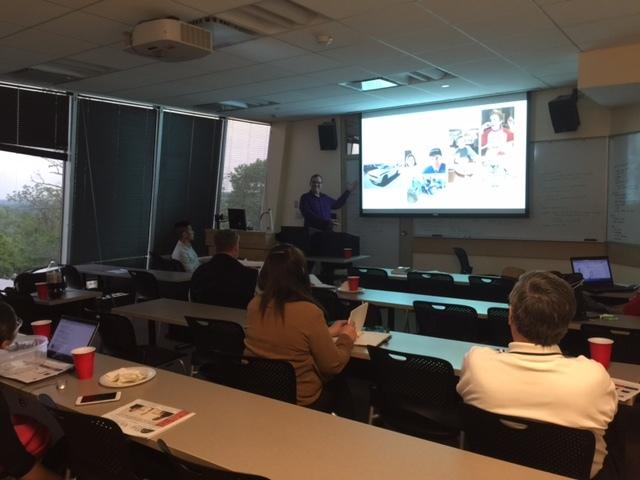
Myself presenting on R on SQL 2016. A topic I barely knew a week earlier!
Take a topic you know a little bit about. Train yourself up on it, and present it as a quick talk at a group! The general rules are:
- Tell them what you’re about to tell them
- Tell them
- Tell them what you told them
Assuming you have practiced your material, I will divulge some secrets:
- People in front of you want to hear what you have to say!
- Most do not know the material even a fraction as well as you do, so you are sharing valuable information.
- People are generally polite, and forgiving of stumbles.
- Speak clearly, and take pauses. Pauses are fine, and let the audience hear and process what you said.
- Take questions. If you do not know the answer, tell them “I do not know. Let’s take that offline and I will research further.”
- Do not let yourself get bogged down with questions. You are speaking, and you are in charge of the movement through your presentation. Own that!
- If someone wants to show off their knowledge, thank them for their contribution, and move on.
Finally, more suggestions:
- Ask for feedback. What went well, what did not?
- Remove emotion from all of this. You are a person, your presentation is something you do, but it is not you.
- Get a mentor, or many. Most people with experience love to help. Just make sure you use the time wisely, ask for specific things, and then act on those that need action!
Life is long, but one common thing about it is communication. Make the most of it, and share yourself through presentations. People want to hear you!
I regularly speak in front of user groups, SQL Saturdays, and of course, customers.
Come to a SQL Saturday, or join a user group near you. Nowadays, I’d say Meetup is the way to find them.
Now, do us all a favor: Go and present! We want to hear your ideas!

Posted in Uncategorized
Leave a comment
What big companies use Microsoft SQL Server?
I had a customer ask me “I cannot find customer examples of large companies that use Microsoft SQL Server“.
I of course laughed, as I work in the Enterprise space for the US Northeast district. I might know some large companies who do.
But who has been willing to go PUBLIC and tell others that this is the case?
And of course, who has SENSITIVE DATA, and who needs HIGH throughput, for massive data sets?
I start with my favorite. The NASDAQ stock exchange. ONE PETABYTE on SQL 2014, for data warehousing:
I curated a few videos and links. Feel free to forward around to brag.
Here is where to search:
Here is the rest of the list that consists of great customer examples:
- Edgenet – “Edgenet Gain Real-Time Access to Retail Product Data with In-Memory Technology”
- Georgia Pacific
- OpenText
- Dell – “Dell wanted to boost its website performance so that each day, its 10,000 concurrent shoppers enjoyed faster response times. The company also needed to increase its ability to support up to 1 million concurrent shoppers during the holidays. To achieve these goals, Dell is migrating mission-critical databases to Microsoft SQL Server 2014 and taking advantage of In-Memory OLTP to store some tables in-memory. By doing so, Dell has sped the performance of databases by up to nine times.”
- Yahoo
- “Yahoo! implemented a solution that takes data from its vast data stores within the Apache Hadoop open-source framework and ultimately moves it to Microsoft SQL Server 2008 R2.” – old school!
- Microsoft (We run SAP for the entire company on SQL Server)
- Cerner (Lync, which uses SQL Server as a back end)
- RHI – “RHI, a global supplier of refractory products, wanted better BI tools. To improve query performance and reporting capabilities, the company implemented a tabular data model based on Microsoft SQL Server 2012 Analysis Services and the new xVelocity memory-optimized columnstore index. Queries that once took more than a minute to run now finish in less than 2 seconds, and the company has a simpler data model that it can use with multiple BI tools. The company can now make better data-driven decisions while cutting costs.”
- Docusign — digital signatures.
I hope this helps you with your own discussions around SQL Server being “Enterprise-Ready”. Microsoft SQL Server should be considered a Tier 1 Database platform!
Please reach out to me with any comments or questions.
Going the distance

Fisherman in Seattle
How far will you go?
Are you willing to change your boundaries to make a difference?
I am talking about physical distance, and how being accommodating to it can improve your career.
When I was young, the 8 miles to the “City” of Middletown, NY to go grocery shopping seemed “Far”. I went to college 2 hours from home, and I got used to the occasional 2 hour drive to home.
Later, while commuting in New Jersey, a rather unpleasant driving experience, I realized it didn’t matter how I felt. I needed to get places, and it would be difficult!
As such, I accepted the things I could not change. Things like: Traffic jams, long commute times, and so forth.
I adjusted my attitude to be positive about what I could adjust. I could get up earlier, beat the traffic, and have time to relax before work! I could listen to books on tape, or a radio station, to kill the time going home.
I took a job in NYC and commuted an hour plus each way by New Jersey Transit commuter rail, to avoid having to drive! I sat down on the train, and arrived. Way less stressful!
This approach can give benefits at work. My first job I was asked if I would fly to Alabama to support data collection on a gas turbine. Sure! Why not! I learned a lot about the great people in a very different place. I also got to experience business travel.
When I joined Microsoft in 2006, I took a travel job. Premier Field Engineer is a role to support enterprise customers for both break-fix onsite support, as well as proactive training, and dedicated remote support.
The travel was good! How else could I ever experience the Chain of Rocks bridge near St. Louis, Missouri for example! How would someone self-select Bartlesville, Oklahoma?
The work I did and distance I traveled rounded me out as a person. From my job history, I have authority in my current role about different industries, geographies, and approaches to solving problems.
I have the benefits as well, of working with great customers that have locations around the world. The travel and people I met have helped me be very productive with people and cultures around the world.
As always, family should come first, and have those discussions as needed.
So the next time you’re asked if you would like to travel for your company, or in a new job, DO IT! You may learn something great about another place, and learn something about yourself.
Posted in Job Performance
Leave a comment
You must be logged in to post a comment.