
I presented SQL Server 2025: The AI-ready Enterprise Database at SQL Saturday Boston 2025!
My shirt is from 2013, when I presented at SQL Saturday Rochester
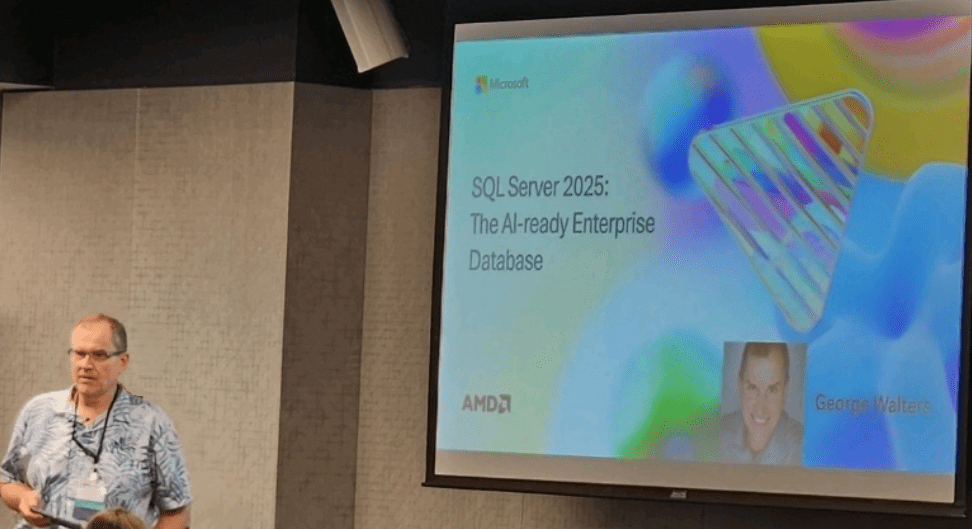
Thanks to AMD and their EPYC processors for sponsoring and having great features that help you run SQL Server faster!
There is a SQL Server 2025 Blog Series for you to keep up.
Here are the big improvements, now in public preview. Most of this is from Microsoft.com learn documentation. At the end, see how Azure Arc can enhance capabilities for on-premises or other-cloud workloads.
AI & Vector Features
| New feature or update | Details |
|---|---|
| Copilot in SQL Server Management Studio | Ask questions. Get answers from your data. |
| Vector data type | Store vector data optimized for operations such as similarity search and machine learning applications. Vectors are stored in an optimized binary format but are exposed as JSON arrays for convenience. Each element of the vector can be stored either using a single-precision (4-byte) or half-precision (2-byte) floating-point value. |
| Vector functions | New scalar functions perform operations on vectors in binary format, allowing applications to store and manipulate vectors in the SQL Database Engine. |
| Vector index | Create and manage approximate vector indexes to quickly and efficiently find similar vectors to a given reference vector. Query vector indexes from sys.vector_indexes. Requires PREVIEW_FEATURES database scoped configuration. |
| Manage external AI models | Manage external AI model objects for embedding tasks (creating vector arrays) accessing REST AI inference endpoints. |
Developer Enhancements
| New feature or update | Details |
|---|---|
| Change event streaming | Capture and publish incremental DML changes of data (such as updates, inserts, and deletes) in near real-time. Change event streaming sends details of data changes such as the schema, previous values, and new values to Azure Event Hubs in a simple CloudEvent, serialized as either native JSON or Avro Binary. Requires PREVIEW_FEATURES database scoped configuration. |
| Fuzzy string matching | Check if two strings are similar, and calculate the difference between two strings. |
| Regular expressions | Define a search pattern for text with a sequence of characters. Query SQL Server with regex to find, replace, or validate text data. |
| Regular expressions functions | Match complex patterns and manipulate data in SQL Server with regular expressions. |
| External REST endpoint invocation | Call REST/GraphQL endpoints from other Azure services from the SQL Database. With a quick call to the system stored procedure sp_invoke_external_rest_endpoint, you can: – Have data processed via an Azure Function – Update a Power BI dashboard – Call a local, in-house enterprise REST endpoint – Talk to Azure OpenAI Services |
| JSON data in SQL Server | Use SQL Server built-in functions and operators to: – Parse JSON text and read or modify values. – Transform arrays of JSON objects into table format. – Run any Transact-SQL query on the converted JSON objects. – Format the results of Transact-SQL queries in JSON format. – Review examples at: JSON data type: Store JSON in a native binary format. |
| Batch mode optimizations for built-in functions | Performance improvements for the following built-in functions: – Mathematical functions – DATETRUNC |
| New Chinese collations | Version 160 to support GB18030-2022 standard. |
New SQL Developer Editions
SQL Server 2025 Standard Developer edition is a free edition licensed for development. It includes all features of SQL Server Standard edition.
- Develop new applications for Standard edition.
- Set up a staging environment to certify the upgrade of an existing application from the Standard edition to SQL Server 2025 Standard edition before deploying it in production.
SQL Server 2025 Enterprise Developer edition includes SQL Server Enterprise edition features.
- Develop new applications for Enterprise edition.
Functionally equivalent to Developer edition in previous versions.
Analytics
| New feature or update | Details |
|---|---|
| Connect to ODBC data sources with PolyBase on SQL Server on Linux | Supports ODBC data sources for SQL Server on Linux. |
| Native support for specific source types | PolyBase services no longer required for parquet, Delta, or CSV. |
| TDS 8.0 support for PolyBase | When you use Features of the Microsoft ODBC Driver for SQL Server on Windows for PolyBase, TDS 8.0 is available for SQL Server as an external data source. |
| PolyBase support for managed identity | Use managed identity to communicate to Microsoft Azure Blob Storage and Microsoft Azure Data Lake Storage. |
Availability and Disaster Recovery
| New feature or update | Details |
|---|---|
| Always On availability groups | |
| Availability group asynchronous page request dispatching improvement | Perform asynchronous page requests and in batches during failover recovery. Enabled by default. |
| Allow database to switch to resolving state | After a failure to read the persisted configuration data due to network service interruption. |
| Configure AG group commit wait in milliseconds | Set availability group commit time in milliseconds for an availability group replica so that transactions are sent to the secondary replica faster. |
| Control communication flow for availability groups | A new sp_configure option lets the primary replica determine if the secondary replica falls behind. With the new configuration option, you can optimize communication between HADR endpoints. |
| Distributed AG support for a contained AG | Configure a distributed availability group between two contained availability groups. |
| Distributed AG synchronization improvements | Improves synchronization performance by reducing network saturation when the global primary and forwarder replicas are in asynchronous commit mode. |
| Fast failover for persistent AG health issues | Set the RestartThreshold for an Always On availability group to 0, which tells the WSFC to fail over the availability group resource immediately when a persistent health issue is detected. |
| Improved health check timeout diagnostics | Improves synchronization performance by reducing network saturation when the global primary and forwarder replicas are in asynchronous commit mode. This change is enabled by default and doesn’t require any configuration. |
| REMOVE listener IP address | New parameter in the ALTER AVAILABILITY GROUP Transact-SQL command lets you remove an IP address from a listener without deleting the listener. |
Set NONE for read-only or read-write routing | When configuring READ_WRITE_ROUTING_URL and READ_ONLY_ROUTING_URL, you can set to NONE to revert specified routing by using the ALTER AVAILABILITY GROUP Transact-SQL command to automatically route traffic back to the primary replica. |
| Configure TLS 1.3 encryption with TDS 8.0 | Configure TLS 1.3 encryption for communication between the Windows Server Failover Cluster and an Always On availability group replica with TDS 8.0 support. |
| Always On failover cluster instance | |
| Configure TLS 1.3 encryption with TDS 8.0 | Configure TLS 1.3 encryption for communication between the Windows Server Failover Cluster and Always On failover cluster instance (FCI) with TDS 8.0 support. |
| Backups | |
| Back up to immutable blob storage | Available when backing up to URL. |
| Back up on secondary replicas | In addition to copy-only backups, you can now also perform full and differential backups on any secondary replica. |
| Log shipping | |
| Configure TLS 1.3 encryption with TDS 8.0 | Configure TLS 1.3 encryption for communication between servers in a log shipping topology. |
Intelligent Query Processing: Contains various improvements aimed at optimizing query execution and overall database performance.
Query Store Enhancements: Now includes the capability to block problematic queries using ABORT_QUERY_EXECUTION, helping maintain system stability and performance.
Security
| New feature or update | Details |
|---|---|
| Security cache improvements | Invalidates caches for only a specific login. When security cache entries are invalidated, only those entries belonging to the affected login are affected. This improvement minimizes the impact of non-cache permissions validation for unaffected login users. |
| OAEP padding mode support for RSA encryption | Support for certificates and asymmetric keys, adding security layers to encryption and decryption processes. |
| PBKDF for password hashes on by default | Uses PBKDF2 for password hashes by default, enhancing password security and helping customers comply with NIST SP 800-63b. |
| Managed identity with Microsoft Entra authentication | Can use the Arc-enabled server managed identity in outbound connections to communicate with Azure resources, and inbound connections for external users to connect to SQL Server. Requires SQL Server enabled by Azure Arc. |
| Back up to/restore from URL with managed identity | Back up to, or restore from, URL with a managed identity. Requires SQL Server enabled by Azure Arc. |
| Managed Identity support for Extensible Key Management with Azure Key Vault | Supported for EKM with AKV and Managed Hardware Security Modules (HSM). Requires SQL Server enabled by Azure Arc. |
| Create Microsoft Entra logins and users with nonunique display names | Support for the T-SQL syntax WITH OBJECT_ID when using the CREATE LOGIN or CREATE USER statement. |
| Support custom password policy on Linux | Enforce a custom password policy for SQL authentication logins on SQL Server on Linux. |
| Configure TLS 1.3 encryption with TDS 8.0 support | TLS 1.3 encryption added with TDS 8 for the following features: – SQL Server Agent – sqlcmd utility – bcp utility – SQL Writer service – Configure usage and diagnostic data collection for SQL Server (CEIP) – Data virtualization with PolyBase in SQL Server – Always On availability groups – Always On failover cluster instances (FCI) – Linked servers – Transactional replication – Merge replication – Peer-to-peer – Snapshot replication – Log shipping Review Breaking changes. |
Database Engine
| New feature or update | Details |
|---|---|
| Optimized locking | Reduces blocking and lock memory consumption, and avoids lock escalation. |
tempdb space resource governance | Improves reliability and avoids outages by preventing runaway workloads from consuming a large amount of space in tempdb. Supports percent-based limits. |
| Accelerated database recovery in tempdb | Provides the benefits of accelerated database recovery for transactions in the tempdb database, such as transactions that use temporary tables. |
| Persisted statistics for readable secondaries | Creates persisted statistics on readable secondaries so that workloads that run against secondary replicas are optimized. |
| Change tracking improvements | Adaptive shallow cleanup improves change tracking auto cleanup performance. |
| Columnstore improvements | Multiple improvements in columnstore indexes: – Ordered nonclustered columnstore indexes – Online index build and improved sort quality for ordered columnstore indexes – Improved shrink operations when clustered columnstore indexes are present |
| Memory-optimized container and filegroup removal | Supports removal of memory-optimized containers and filegroups when all In-Memory OLTP objects are deleted. |
| tmpfs support for tempdb on Linux | Enable and run tempdb on tmpfs for SQL Server on Linux. |
| ZSTD Backup compression algorithm | SQL Server 2025 (17.x) Preview adds a faster and more effective backup compression algorithm – ZSTD. |
| Optimized sp_executesql | Effectively reduce the impact of compilation storms. A compilation storm is a situation where a large number of queries is being compiled simultaneously, leading to performance issues and resource contention. Enable this feature to allow invocations of sp_executesql to behave like objects such as stored procedures and triggers from a compilation perspective.Allowing batches which use sp_executesql to serialize the compilation process reduces the impact of compilation storms. |
| Time-bound extended event sessions | Automatically stops an extended events session after a time limit elapses. This helps avoid situations where sessions might be left running indefinitely by mistake, consuming resources and potentially generating a large amount of data. |
| PREVIEW_FEATURES | Database scoped configuration allows you to enable features that are scheduled for general availability after this version of SQL Server releases for general availability. Review these features in release notes. |
Query Store and intelligent query processing
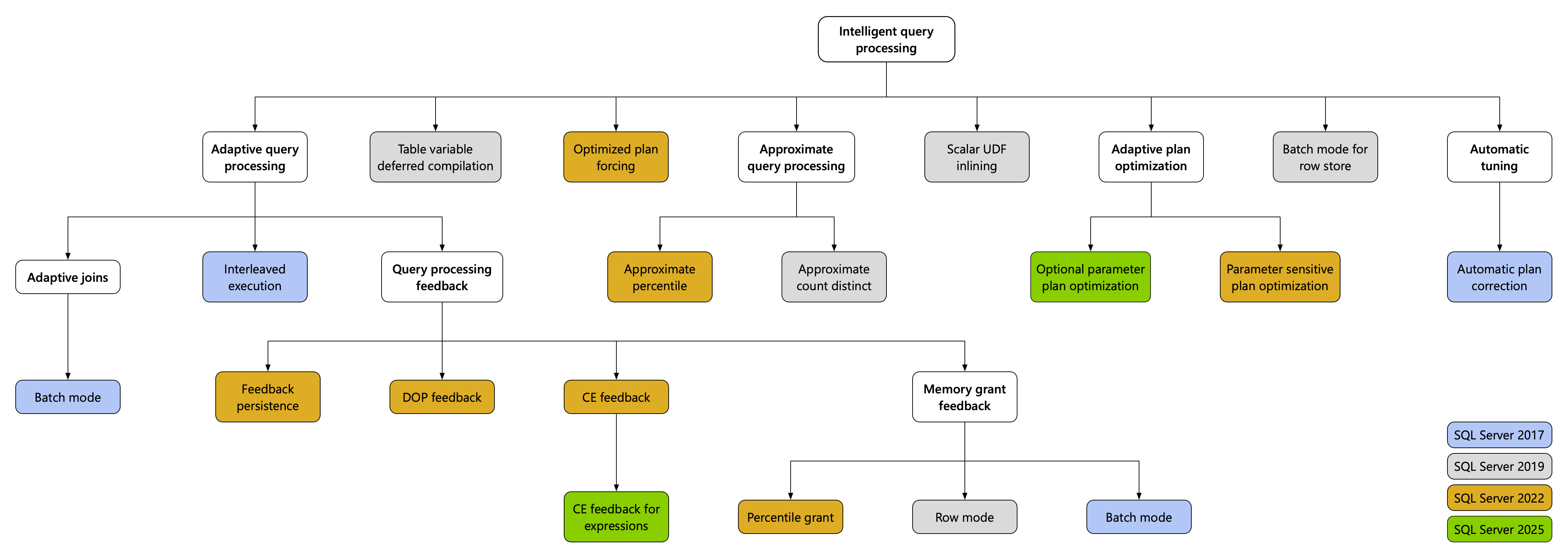
The intelligent query processing (IQP) feature family includes features that improve the performance of existing workloads with minimal implementation effort.
| New feature or update | Details |
|---|---|
| Cardinality estimation feedback for expressions | Learns from previous executions of expressions across queries. Finds appropriate cardinality estimation (CE) model choices and applies to future executions of those expressions. |
| Optional parameter plan optimization (OPPO) | Leverages the adaptive plan optimization (Multiplan) infrastructure that was introduced with the Parameter Sensitive Plan Optimization (PSPO) improvement, which generates multiple plans from a single statement. This allows the feature to make different assumptions depending on the parameter values used in the query. |
| Degree of parallelism (DOP) feedback | Now on by default. |
| Query Store for readable secondaries | Now on by default. |
| ABORT_QUERY_EXECUTION query hint | Blocks future execution of known problematic queries, for example nonessential queries affecting application workloads. |
T-SQL Language
Lots of new language related to the AI features, JSON, etc.
Linux
Microsoft Fabric Integration: Offers a unified analytics platform that integrates various data and analytics services to streamline operations.
| New feature or update | Details |
|---|---|
| Mirroring in Fabric | Continuously replicate data to Microsoft Fabric from SQL Server 2025 on-premises. Microsoft Fabric already includes mirroring from a variety of sources, including Azure SQL Database and Azure SQL Managed Instance. For more information on SQL Server 2025 database mirroring to Fabric, see Mirrored SQL Server databases in Microsoft Fabric. |
Starting in SQL Server 2025 (17.x) Preview, on-premises reporting services is consolidated under Power BI Report Server. For more information, see Reporting Services consolidation FAQ.
Discontinued Features
Data Quality Services (DQS) is discontinued in this version of SQL Server. We continue to support DQS in SQL Server 2022 (16.x) and earlier versions.
Master Data Services (MDS) is discontinued in this version of SQL Server. We continue to support MDS in SQL Server 2022 (16.x) and earlier versions.
Synapse Link is discontinued in this version of SQL Server. Use Mirroring in Fabric instead. For more information, see Mirroring in Fabric – What’s new.
Breaking Changes
SQL Server 2025 (17.x) Preview introduces breaking changes to a few SQL Server Database Engine features, such as linked servers, replication, log shipping, and PolyBase.
For more information, see Breaking changes in SQL Server 2025 Preview.
Learn more
- Microsoft Build 2025: SQL Server 2025: The Database Developer Reimagined
- Docs: aka.ms/Build/sql2025docs
- Announcement blog: aka.ms/sqlserver2025
- SQL Server homepage: https://www.microsoft.com/en-us/sql-server
- MSSQL Extension for Visual Studio Code with GitHub Copilot: https://aka.ms/vscode-mssql-copilot
Microsoft has Azure Arc to enhance your on-prem or other-cloud capabilities with some Azure features:
Azure Arc for SQL Server 2025 – Key Benefits
| Feature | Description |
|---|---|
| Centralized Management | Manage all SQL instances (on-prem, edge, multi-cloud) from the Azure portal. |
| Inventory & Insights | Unified view of versions, editions, and compliance across environments. |
| Security & Governance | Entra ID integration for MFA/SSO, apply Azure Policy for consistent security. Extended security updates delivery. |
| Operational Efficiency | Automated backups, patching, and best-practice assessments. |
| Hybrid Flexibility | Pay-as-you-go licensing for SQL components (DB Engine, SSAS, SSRS, PBIRS) and centralized view of Licenses |
| Migration Acceleration | Continuous assessments, real-time replication, and Copilot-assisted provisioning. |
| Azure Integration | Use Azure Monitor, Defender for Cloud, and other services without moving data. |
| Learn more | SQL Server enabled by Azure Arc |
| Azure Arc overview |

As always, we have lots of learning resources available to help you!


 George Walters
You must be logged in to post a comment.