
I presented Microsoft Fabric to the New England SQL User group on May 8th 2024! What a great crowd! If your are local to eastern mass, and do data work with Microsoft products, consider joining!
This content provides a detailed overview of Microsoft Fabric and related terminologies, tutorials, and SKUs.
Here are some of the highlights of the content, and some links to help you dive deeper:
- Microsoft Fabric: Microsoft Fabric is the data platform for the era of AI, with everything unified, SaaS-ified, secured and governed
- You can follow a guided tour of Microsoft Fabric — there are many experiences, from data science, to data warehousing, data observability, pipelines, real time analytics, and the well-known Power BI reporting.
- OneLake is a single SaaS lake for the whole organization, with all data organized in an intuitive hierarchical namespace. The underlying format is Delta on top of Parquet, on Azure storage.
- There is a Decision Guide to help you formulate when to you which data store, based on use case.
- Metadata to connect you to other storage, without copying data to Onelake, known as shortcuts, connect you to other cloud storage like S3, Google storage, and Databricks delta lake, and letting you query that data remotely.
- Copilot in Microsoft Fabric is generative AI for every step of your data journey, unlocking data, enhancing productivity, and accelerating insight discovery. Three experiences exist currently:
- Partner Ecosystem: Microsoft Fabric has a strong partner ecosystem, with hundreds of partners to help with add on capabilities, or extensions, or system integrators to help you deploy.
- Microsoft credentials: Exam DP-600: Implementing Analytics Solutions Using Microsoft Fabric, DP-600 https://learn.microsoft.com/en-us/credentials/certifications/exams/dp-600/
Fabric Terminology:
- Capacity: Capacity is a dedicated set of resources that is available at a given time to be used. Capacity defines the ability of a resource to perform an activity or to produce output. Different items consume different capacity at a certain time. Fabric offers capacity through the Fabric SKU and Trials. For more information, see What is capacity?
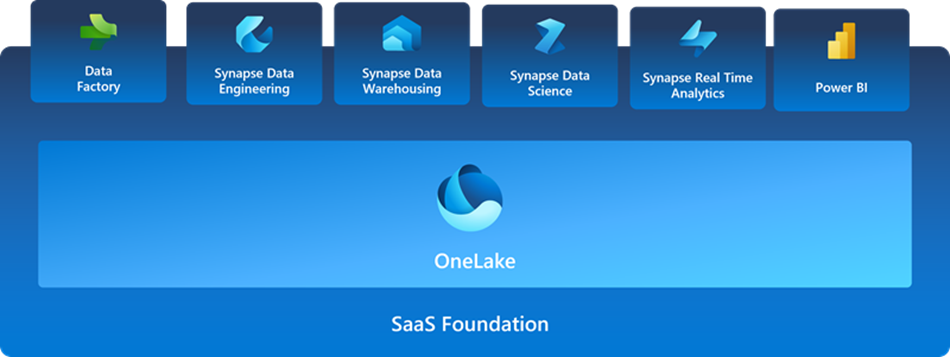
- Experience: A collection of capabilities targeted to a specific functionality. The Fabric experiences include Synapse Data Warehouse, Synapse Data Engineering, Synapse Data Science, Synapse Real-Time Analytics, Data Factory, and Power BI.
- Item: An item a set of capabilities within an experience. Users can create, edit, and delete them. Each item type provides different capabilities. For example, the Data Engineering experience includes the lakehouse, notebook, and Spark job definition items.
- Tenant: A tenant is a single instance of Fabric for an organization and is aligned with a Microsoft Entra ID (formerly Azure Active Directory ID)
- Workspace: A workspace is a collection of items that brings together different functionality in a single environment designed for collaboration. It acts as a container that uses capacity for the work that is executed, and provides controls for who can access the items in it. For example, in a workspace, users create reports, notebooks, semantic models, etc. For more information, see Workspaces article.
Microsoft Fabric operates on two types of SKUs:
- Azure – Billed per second with no commitment.
- Microsoft 365 – Billed monthly or yearly, with a monthly commitment
Azure SKUs, also known as F SKUs, are the recommended capacities for Microsoft Fabric. You can use your Azure capacity for as long as you want without any commitment. Pricing is regional and billing is made on a per second basis with a minimum of one minute.
Azure capacities offer the following improvements over the Microsoft 365 SKUs.
- Pay-as-you-go with no time commitment.
- A capacity reservation. This feature allows you to reserve a capacity for a specific period of time, and save money on your Azure bill. A reserved capacity is no longer charged at the pay-as-you-go rates.
- You can scale your capacity up or down using the Azure portal.
- You can pause and resume your capacity as needed. This feature is designed to save money when the capacity isn’t in use.
- Microsoft Cost Management.
- Azure Monitor Metrics.
The following tutorials walk you through scenarios within specific Fabric experiences.
| Tutorial name | Scenario |
| Power BI | In this tutorial, you build a dataflow and pipeline to bring data into a lakehouse, create a dimensional model, and generate a compelling report. |
| Data Factory | In this tutorial, you ingest data with data pipelines and transform data with dataflows, then use the automation and notification to create a complete data integration scenario. |
| Data Science end-to-end AI samples | In this set of tutorials, learn about the different Data Science experience capabilities and examples of how ML models can address your common business problems. |
| Data Science – Price prediction with R | In this tutorial, you build a machine learning model to analyze and visualize the avocado prices in the US and predict future prices. |
| Application lifecycle management | In this tutorial, you learn how to use deployment pipelines together with git integration to collaborate with others in the development, testing and publication of your data and reports. |
Please check the Fabric Blog for more updates!
I hope this material helps you get started! Feel free to reach out to me on LinkedIn if you need help!


 George Walters
You must be logged in to post a comment.